Skip to content


Taking my Leave

I’m not very good at taking holidays. Every year my line manager has to remind me to take some leave. The problem is that I actually enjoy my job. My friends now all have jobs or families so there’s not people I can just casually hang out with if I take some days off. I don’t have kids, so don’t have that kind of need for structured and planned holidays.

I’ve found some ways of actually taking and enjoying leave, and they may be of interest to others.

The key issue is my martyr-like belief that everything will go horribly wrong if I don’t pay attention to what’s going on at work.

That is, sadly, quite true. I’ve been away from the office for about 2 weeks (counting in the Repository Fringe unconference). In that time, I’ve had a few urgent work things:

  • To review the final version of a job description we need to get out urgently
  • The place my immediate team were relocating to got changed to somewhere less desirable. If I’d not intercepted that we might have had 33% less floor space than initially agreed, for the next year or two.
  • An enquiry about requirements for another possible position, which would directly relate to my area of responsibility. (but as sorting out stuff for jobs takes ages, that’s less worrying)
  • Being asked to sign off on a description of a training event I’m running in October (asked at 5pm to sign off on it for next day).
  • Uploading data into a new system so people can start working with it ASAP.

Most of these can be achieved via half an hour’s attention, and I feel much more relaxed for knowing they are in hand rather than fretting. Some of these really did require my urgent attention, and if I’d not answered the emails I would be the one who ends up in the worse situation.

These new positions are a result of our work being seen as a success by various powers, which is great, but some care and attention is needed to ensure they actually achieve the actual intent behind creating them.

The trade off is that I’m not often in the office at 9am on work days.

Email Triage

I’ve been getting more and more organised about how I handle emails. On average I get maybe 80 a day now, which is much lower than the 150 of a few years back.

My first strategy has been to unsubscribe from everything I don’t really care about. I actually *do* want emails for “you have a direct message on twitter”, and if you message me on facebook it emails me so I don’t have to monitor my facebook inbox. However I’ve lots of random twitter accounts and these I have told to stop emailing me updates. Anything with an “unsubscribe” link gets clicked before I delete it. God damn you and your call-for-papers.

The key change has been to move to a two-tier inbox system. I now use my INBOX only for actually incoming messages, and they are either deleted, moved-to-archive or moved-to-TODO. Even if it’s just a case of “I need to read that but it’ll require my full attention” it goes into TODO. About 95% of messages get deleted or read and moved to archive.

The problem with this is is that it’s actually still quite a pain to move a message to a folder. When Thunderbird introduced a much better search tool I gave up using lots of folders for my email archive and just use the “a” key which moves the email to archive/2013 (the current year). This still left me with the faff of dragging stuff into the TODO folder and so I looked into how to speed this up.

Dial “T” for “TODO”

I spent a bit of time looking into custom keys for Thunderbird and found “keyconfig” which does exactly what I want. It runs some javascript when you press a key (or key combo). In this case I’ve mapped “T” to:

MsgMoveMessage(GetMsgFolderFromUri(“imap://cjg@imap.ecs.soton.ac.uk/_TODO_”))

(My TODO folder is called _TODO_ so it sorts first, alphabetically).

This means I can now triage my inbox 3 or 4 times a day in a very short amount of time, even when on leave. It means I know I’ve got a bunch of stuff in my todo list, but none of it urgent. Sometimes I leave genuinely urgent stuff in the INBOX, but it’s only one or two items so I don’t have that feeling of amorphous dread that I used to get from knowing some of those 300+ messages were important.

Vacation Message

I’ve noticed that after a couple of weeks away from the office, my vacation auto-messages are beginning to have an impact. People know I’m away and are emailing me much less. I’m seriously considering next time actually putting a “I’m going on leave” into my .sig file a week before hand next time I take a long leave.

Delegation

I don’t like the idea of leaving people hanging. Some of the emails I get are about serious problems and if these are only addressed to me (not cc’d to someone else), I’ll reply to say I’m on leave and cc someone else on the team who might be able to deal with it. This way I don’t have that nagging sense of guilt that my taking leave is causing problems. (yeah, martyr complex yadayada)

Ventnor FringeV.I.G.

This is the key part of how I’m actually keeping from worrying too much about what’s happening back in the office. I’ve volunteered to help at the Fringe festival in Ventnor, the Isle of Wight town where I grew up. Much of this involves some similar work to what I used to do for Dev8D. You’ll notice the programmes look quite similar: dev8d, vfringe. The vfringe one is a much more developed version of the tools, but it’s also been heavily hacked.

At my suggestion, Joe (the VFringe Webmaster) used Drupal for this year’s site. He’s done some great work configuring it and is using it as a database of events and a way to manage memberships & volunteers. Also, because it’s a full CMS, most of the core team can log in and update details.

Being an alleged “web expert”, I’ve done my best to be helpful without treading on the toes of the young people organising the event. I’m here to help, not take over. This year I’ve come a whole week before the festival starts (staying with friends to keep the costs down) and that has worked much better than trying to do stuff remotely. My concerns about whether or not they really even want my help was allayed when the first thing they did when I showed up was given me a full-administrator account!

In previous years, we’ve used a Google Docs spreadsheet to collect the data for themes, locations and events. This year we’re pulling the list of events directly from the Drupal site. (I’ve made a custom view containing all the data I need, then munge that into usable data). There’s a few issues. The key one is that while an event can have multiple start times, the node-type allows only one location. Also, Joe used a free-text-tagging system for the start times, which has produced a variety of horrors. A mix of 4pm 4:00pm and 4.00pm. Most of them could be read with a well-tuned regular expression, and the last handful I fixed by hand. If we had it over, what we’d really like is if we could have a list of performances, per activity, where each one has a distinct start date+time, end date+time, venue and prices. Chances are someone may have thought of this in the past, if not, it’s a handy plugin to make.

I spent a couple of days just refining my fancy views of the programme, like the day planner, a all-in-one-page programme designed to be saved on your mobile device in case of connectivity issues, and a “what’s on now/next” animation which appears on the homepage. All my bits and bobs use RDF & Graphite as a backend, but that’s just my usual toolbox, nobody here will be consuming this open data except me.

I spent the best part of a day using a pub wifi and keying in all the little events and bar opening times etc. into the site, so that they all appear in the programme when people are planning their day. This was done while drinking some nice, but not-to-strong, beer, and with a view over the beach to the channel. This doesn’t sound like everyone’s ideal holiday but it gives me something tangibly useful to do outside of work and that helps me actually relax. It’s not very difficult, I’m good at it, and every hour I spend doing the grunt web-work is an hour I’m freeing up for one of the organisers to, well, organise.

I also spent half a day helping decorate one of the festival bars. A bit of honest and useful exercises right on the seafront is also a refreshing and satisfying way to spend my time.

I also ended up handling an issue of video encoding for them. They made a 2 minute video to be screened on the Red Funnel ferries, so that people on their way from Southampton to The Island will be made aware of the Fringe Festival. It was a bit of a nightmare, and I’m glad it was me dealing with it. The correct encoding, should you ever need to make an advert for the ferries, is an mpeg-encoded .avi file.

This is not a technology-focused festival. It’s about poetry, art, music and drama. Hence most of the organisers are very different to what I’m used to in Library, Data and Programming events. But it also means that my specialisms go much further and I can save them from work, and do things they just plain couldn’t do otherwise.

If I could change one thing, it would be to buy them all little policeman-style notebooks, with general notes and a note page for things they each need to do morning/afternoon/evening each day leading up to and during  the festival. They rely too much on their memories and this makes them stressed as their memories of all the stuff they have to do is a bit like my relation to my INBOX  a couple of years ago. There’s tons to remember, and a few really important things, but it turns into a stress-inducing blob in memory. They are not great at keeping people informed of what’s going on, and that’s a hard skill to master. A key thing is getting back to people when you said you would, even if there’s no news. That way people know they are in the loop. Otherwise they fret as they assume they’ve been forgotten. It’s a tricky relationship as there’s over 300 people involved in various capacities, and for each group, their performance is absolutely the most important single thing to them, but only one of many for the festival organisers.

Did I mention that the oldest organiser of this 4 day, 21 venue festival is only about 22 years old? The work they are doing is fantastic and I’m proud to be able to help.

Death & CigarettesToday I’ve done must of my helping so I’m off to the Woodland Bar, they’ve built in the street where I used to live, and will finish off my comic. It’s the last story in a comic which has run for 25 years. I’m not anticipating a happy ending for John Constantine. This evening I’ve got tickets for a magic and burlesque show and after that there’s a lock-in at Ventnor library with spoken word performances compered by Dizraeli of Dizraeli and The Small Gods fame. I worked my way through the science fiction and computer programming books as a teenager. You kids with wikipedia don’t know how damn lucky you are!

Volunteer

To get back on topic, I think finding something useful to do with your leave is really effective as a way to stop worrying about work. I know at least three techies who have worked on shows at the Edinburgh Fringe. I think there’s real value and satisfaction in us dev’s using our skills in volunteering & charity work rather than just donating a monthly amount or doing unskilled labour for them.

So I’ve actually had some genuinely refreshing leave. I’ve learned a bit about Drupal, and haven’t just spent my whole time playing Minecraft or in the pub.

Now I’ve just got to find a way to use up another 14 days leave before they expire on October 1st…

Posted in Conference Website, Drupal, Events, Graphite.

Tagged with , .


Retreieve by Path feature in the works for Graphite v2.0

I’ve been working on a rather funky new feature for Graphite v2.0. It’s a logical extension of the existing Resource Description feature, but it won’t replace it as th resource description feature lets you describe very simple paths out from a resource in a SPARQL endpoint, which gives a clear tree structure suitable for turning into JSON so that’s still kinda useful.

This new function uses a modified version of the SPARQL 1.1 path syntax. I’ve added a couple of features and cheated a bit, but it’s damn useful.

foaf:name or <http://xmlns.com/foaf/0.1/name> would match triples having the topic as a subject.

^foaf:member matches triples having the topic resource as the object.

foaf:member/foaf:name matches all the triples having the topic as the subject of a foaf:member triple AND where the object matches the subject of a foaf:name triple (and get that triple too). If wanted all foaf:member triples regardless of the foaf:name you can use foaf:member|foaf:member/foaf:name

You can use ! to negate a set of predicates ie. !(foaf:name|foaf:mbox) gives all triples with the topic as a subject EXCEPT foaf:name or foaf:mbox triples.

You can use regexp style +, ?, * and {n,m} to indicate that a path should be repeated. However I’ve cheated a bit here so it’s not unlimited. By default it repeats things up to 8 times so + is treated as {1,8}. That’s a bit of a cheat but it works and you can change the depth.

The additions I’ve made is “.” to match any predicate. So a path of “.”

The call will be something like this:

$graph = new Graphite();
$graph->ns( “sr”, “http://data.ordnancesurvey.co.uk/ontology/spatialrelations/” );
$thing = $graph->resource( “http://id.southampton.ac.uk/building/32” );
$endpoint = “http://sparql.data.southampton.ac.uk/” );
$n = $thing->loadSPARQLPath( $endpoint, “.|(./(rdfs:label|a))|(^sr:within)+/(rdfs:label|a)?” );

$n is set to the number of triples returned.

What this actually does is returns:

all the triples with <…/building/32> as the subject, their label and type, plus all the things within the building, or within things within the building etc. and their label and type, if any.

OK. The above query is a bit much and takes about 5 seconds to return. Turning the + on within into a {1,3} cuts it to a more reasonable 0.8 seconds.

This is just the first cut and I’m posting it here for suggestions. It’s not yet ready for integration into the core library but if you like it, have suggestions or other requests for Graphite v2.0 please leave a comment.

If you would like to help out, we could really do with someone running some kind of user community, but I just don’t have the time.

Update: Try a live demo!

Posted in Graphite.


Research Data Onion

We’ve been thinking a lot about research data and how to manage it, how to open it, how to share it, and how to get more value from it without making too much extra work. For some time I’ve been considering two different ways to think about research data.

The Onion Diagram

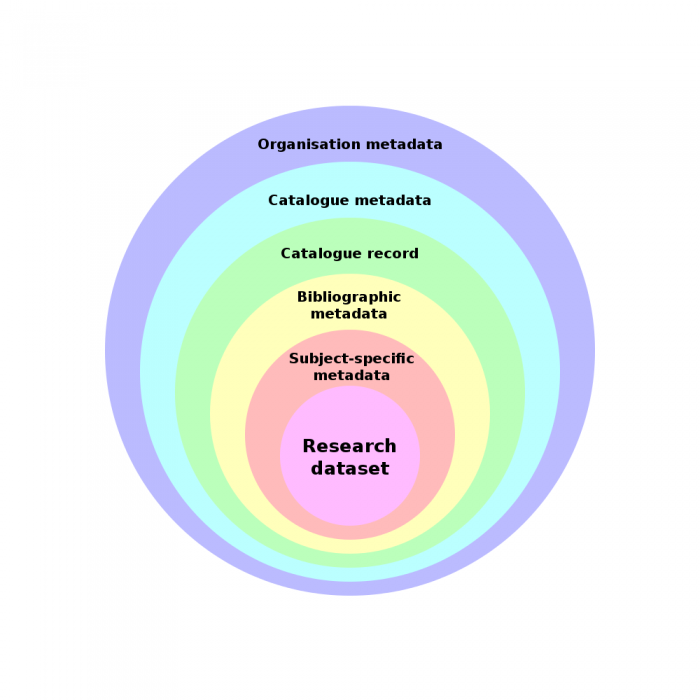
The first is this diagram, which shows the various layers of metadata which I see as surrounding a research dataset.

Research Data Onion

Some of these layers are less obvious than others. The important thing is that each layer is created at a different time and process, has a different purpose and different people are responsible for it.

Often these layers are merged into a single database record, but it’s useful to think about them as distinct layers when looking at how to manage them.

As I’m most familiar with EPrints, I’ve included examples of where this information would be handled in that software if it was being used as a repository + catalogue for research datasets.

1. Research Dataset

This is the actual dataset produced as part of a research activity. It may be tiny or huge. It may or may not be available from a URL. In rare cases it may not be digital (a hand written log book of results). It might be the weird file format that the lasercryomagnoscopeatron produces, an excel spreadsheet or a hundred XML files. It may make sense to only a few people or tools.

If you are using EPrints as a dataset store+catalogue, this would be a document attached to an EPrints record.

2. Subject-specific Metadata

This will be provided by the researcher, and research communities will need to decide what goes in this metadata. Librarians can certainly advise and assist but the buck stops with the researchers. This layer provides the research context for the dataset, it may include information about the processes used, the type and configuration of equipment. Long term, I expect equipment manufacturers to be able to create much of this and output it with the raw dataset, similar to how modern digital cameras embed EXIF data in the JPEG images they create.

This might be as simple as a text description of anything you might need to know before working with the data, such as assumptions made, or the sample size etc, but I suspect we’ll see some fields start to standardise what metadata should be provided for certain types of experiment.

In a subject-specific archive this metadata may be merged with the other layers of metadata but in a institutional repository there will be all kinds of weird and wacky datasets so its important that the people running the data catalogue are not proscriptive about this metadata, although a subject specific harvester may make some rules about what it should contain.

If you are using EPrints, this data would be stored in a supplimentary document attached to the record. A few years back we added a “metadata” document format for exactly this purpose.

I would expect that, in time, subject specific tools would harvest this data from multiple sources and give subject-specific search and analysis tools which would be beyond the scope of the university repository, but easy to implement on a big pile of similar scientific metadata records from many institutions, eg. a chemical research metadata aggregator could add a search by element (gold, lead..) which would be beyond the scope of the front end of the archive where the dataset is held.

3. Bibliographic Metadata

Here we get to most people’s comfort zone. This is the realm of good ol’ Dublin Core. This describes the non-scientific context of the dataset: who created it, what parts of what organisations were involved, when, where and who owns it and what the license is.

With my “equipment data” hat on, this seems like the layer which associates the dataset with the the physical bit of equipment (eg. http://id.southampton.ac.uk/equipment/E0007), the facility, the research group, funder. Stuff like that. Things which the library and management care about, but don’t really matter to Science, unless you are evaluating how much confidence you have in the researchers.

In EPrints this is the metadata which is configurable by the site administrator and entered by the depositor or editor.

4. Data Catalogue Record Metadata

This is any data about the database record. Most of this will be collected automatically. It’s often in the same database table as the bibliographic data but it’s not quite the same thing.

This layer of the onion is stuff like who created the database record, when, what versions there have been. This can generally be created automatically by the repository/catalogue software.

In EPrints this is the fields which the system creates automatically.

This is generally merged with the bibliographic data layer unless you are doing some serious version control, but it is a distinct layer of metadata.

5. Catalogue Metadata

These last two layers are not really considered most of the time, but if we want things to be discoverable and verifiable it’s helpful to quantifiable.

This is the layer of metadata about the data catalogue itself. Not all data catalogues actuallycontain the the dataset, they may have got the record from another catalogue.

Anyhow, this layer tells you about what the catalogue contains, broadly, and the policies and ownership of the catalogue itself.

In EPrints this would be the repository configuration such as contact email, repository name, plus the fields which describes policy and licenses which many people don’t ever bother to fill in. You can see this data via the OAI-PMH Identify method.

6. Organisation Metadata

This is something which nobody has given that much thought to yet, but for data.ac.uk we’ve proposed that UK universities should create a simple RDF document describing their organisation, with links to key datasets, such as  a research dataset catalogue, and other datasets which may be useful to automatically discover. This allows the repository to be marked as having an official relationship to the organisation. Some more information is available from the equipment data FAQ.

Peeling the Onion

The last step is to make the Organisation Profile Document (layer 6) auto discoverable, given the organisation homepage. This means you can verify that an individual dataset is actually in a record, in a repository, which is formally recognised by the organisation (as oppose to set up by a stray 3rd year doing a project, or a service with test data etc). Creating and curating these layers provides auto-discovery and probity in a very straight forward manner.

Posted in Research Data.


FatFree, RedBean and FloraForm – A light and flexible web framework

In December Web Team spent some time playing with web frameworks. My previous framework experience is with Django which I highly recommend but that was not appropriate here because Python is not one of iSolutions supported web languages. As a result we spent some time researching PHP frameworks. PHP is a bit of a hodge podge and PHP frameworks are no exception, there are a lot of  different options.

  • Zend – Zend framework seems to be a everyone’s go to framework. I found it quite large and actually difficult to get set up and running meaning it was non starter. We do agile here if it takes more than 5 minutes to get started then you’ve missed the boat. It is very full featured and has big user base but seems to be aimed at “enterprise” which is a word I usually replace with “over complicated”.
  • Cake – A bit easier to get started with than Zend and still fairly comprehensive. The Object Relational Mapper felt a bit backwards but it is popular and good community support.
  • FuelPHP – I Invested a fair bit of time into this. Very cool, lots of nice features, good ORM. A bit complicated and the documentation and user community was a little new. I complained about the documentation being a bit lacking in places and they fixed it but I still wasn’t confident enough to choose it as solution.
  • FatFree – Really pleased with this and chose it. The reasons are discussed below.

So why FatFree? Zero to writing code in less than 5 minutes. There are very few files and you can throw away the bits you don’t want to use. The documentation is good and Googling for problems gets solutions. Now the for real reasons. The other frameworks I looked at all require you to work inside them. We have a huge web presence which has been grown over 15 years rather than designed. FatFree let me use my old PHP and pepper it with FatFree. Over time more of the code we write will be converted to FatFree but we didn’t have to do a huge big bang move. Being able to gradually improve our existing stuff was important. Also FatFree is not trying to do EVERYTHING and as a result it is built to work with code which was not really design to integrate with FatFree . The best example is the ORM. FatFree provides a very basic Object Relational Mapper (takes php objects and stores in database). This would be a weakness if it was harder to integrate other libraries into FatFree. Enter RedBean PHP.

RedBean is the best object relational mapper I have ever used, absolutely no question about it. When prototyping an app in FuelPHP I had to know exactly what I wanted the database to look like at the start. RedBean lets you completely change that around exactly as you see fit while you program and just works out how to store it all in the database. There are a few nuances, aliasing had me completely stumped for about 20 minutes, but it’s easy when you’ve cracked it. The one thing missing was a slick way to take user input but FatFree’s flexible design enabled us to use the FloraForms library Chris had written.

FloraForm lets you easily construct a form, parse input and customize validation. There is still a bit of work required to make this a really reusable but it has become part of our core tool set so expect work in this area. The thing which made FloraForm the ideal addition to this little toolkit is it returns all of your form inputs in a big PHP hash. From this hash a 10 line function serializes the data into RedBean objects and similar 10 line function de-serializes it back into the form. The result is constructing a FloraForm interface builds your database tables and stores your data. This is a very fast and powerful combo. For simple systems you will need to do no further work and you can prototype complicated systems very fast and allowing you do make your radical design overhauls with very little effort. This is ideal for the ever changing goal posts of real world development with limited staff time.

One final note about FatFree worth mentioning is that it allowed members of the team which have not done framework development before to gently transition into frameworks. This may not sound significant but in a busy working environment having to completely overhaul your working practices in one go is very painful and time consuming. Day one of FatFree you can just use the router and do everything else as normal. After that maybe you will experiment with templates. Next time you build a database have a play with RedBean. Before you know where you are you are a full-blown framework developer without the upheaval of having to learn to do your job from scratch.

Posted in Best Practice, Open Source, PHP, Templates, Uncategorized, web management.

Tagged with , , , , , .


Twilight of the JISC

This year many JISC funded services are “sunsetting”, presumably due to the cuts.

(nb. not everything JISC does is ending, but enough to be pretty brutal)

I have benefitted hugely in my career and projects from the support of many JISC services, events and staff. Dev8D changed my professional life in a really good way.

I offer my sincerest thanks to all JISC funded staff moving on to new jobs this year.

– Christopher Gutteridge

How have JISC staff, services or events helped you?

UPDATE: OSS Watch “changing funding model” http://osswatch.jiscinvolve.org/wp/2013/02/15/a-new-future-for-oss-watch/

Posted in Uncategorized.


Gateway to Research API Hack Days

Ash and I are at the Gateway to Research API hack days. Gateway to Research contains data since 2006 about UK research project funding and related organisations, people and publications.

They use the CERIF data model, which is a bit of a monster. The CERIF people are very nice, but have limited resources to produce the kind of documentation I’ve become accustomed to. I enjoy cursing the darkness, but eventually I feel guilty and decide to light a candle. The CERIF people kept looking sad when I berated them about documentation, and all they really had were the XML from their modelling tool (TOAD) and the XSD documnent which it spits out. With some Perl & DOM hacking and lots of advice from them, I’ve managed to produce a CERIF description document which I feel is more useful to code hackers who get twitchy when the only documentation is in PDF and the only introductions are in Powerpoint slides. They got me a couple of pints as thanks, which was nice.

GtR API

I’ve also been kicking around the API. The things I noticed were some minor inconsistancies with XML naming which I’ve pointed out to them. But they are niggles. There’s more pressing things so here’s my wishlist:

  • URI scheme: All (most) stuff in GtR is identified by a UUID but it would be very helpful for creating linksets.
  • Data dump location with ALL the data in one big file (maybe put this on bit-torrent)
  • In the individual pages put <link rel=’alternate’ > headers and icon on the HTML pages to link to the XML and JSON versions of the information.
  • RDF Output (well, I would say that, wouldn’t I)
  • Release the code early and often. The current plan is to release code at the end of the project which means no community input to the code will be possible.

Posted in Gateway to Research.

Tagged with .


Agile Documents for agile development

Like a lot of large IT providers the work we do here in iSolutions is often steeped in documentation. This comes in various levels of usefulness from “god send” down to “written but never read” (aka complete waste of staff time). In TIDT our processes tend to be quite documentation light. If a document doesnt serve a purpose to us we do not write it. Less time shuffling paper means more time writing code. However just because we do not have a lot of paper work does not mean we do not have a plan. We work closely with users and develop in a agile way. Because our changes are small and frequent we use need far less documentation per change.

People who do not understand the way we work don’t understand our documentation. A excellent example is a document  (linked bellow) emailed to me by Lucy Green from comms regarding some changes to SUSSED. This documentation is a beautiful example of  agile documentation. It is information heavy, easy to understand and because the change is relatively small it is nice and short. Writing it down serves an important purpose because it gives us an artefact to talk around in our meeting. Because it’s highly visual there are fair less misunderstandings of intent. Documents like this make me happy. It tells me what I need to know. After the change it will serve no purpose, the reasons for making the change will be listed in the iSolutions formal change management documentation a much drier and less well read affair.

Agile documentation

Posted in Uncategorized.


Adding a custom Line Break Plugin to the TinyMCE WYSIWYG editor inside Drupal 7

This is a long title for a blog post, but it is a complicate and tricky task and I couldn’t find a complete solution, so this is a summary of how I did it. It also provides a good basis for adding other features to TinyMCE inside Drupal. First of all, the versions of the software I was working with were TinyMCE 3.5.4.1 and Drupal 7.14 (yes, we need to upgrade that!) I spent a lot of time hacking inside the Drupal WYSIWYG plugin and inside tinyMCE itself before I discovered the clean plugin-base solution. My starting point was this simple TinyMCE newline Plugin from SYNASYS MEDIA. This didn’t work for me out of the box. I came as only compressed javascript, so I had to figure out how to decompress it first. Once I’d done that, after lots of debugging I worked out that the reason I couldn’t get it to show up inside Drupal is that you have to make a new (minimal)  Drupal plugin to register it properly with the WYSIWYG plugin (see below). After that I worked out that they had used ‘<br />’ which didn’t work in all circumstances so I changed it to “<br />\n” which nearly did what I wanted but the cursor got screwed up if you did newline at the end of the text, so I tried adding ed.execCommand(‘mceRepaint’,true); but that didn’t help. I kept looking at the list of mce commandsand spotted “mceInsertRawHTML” but that was worse. In the end I decided to ignore the glitch as it’s purely cosmetic.

My final version is below. I’ve kept the name “smlinebreak” but I’ve bolded it so if you wanted your own name for a plugin you can see where you’d have to tweak it.

(function(){
        tinymce.PluginManager.requireLangPack('smlinebreak');
        tinymce.create(
                'tinymce.plugins.SMLineBreakPlugin',
                {
                        init:function(ed,url){
                                ed.addCommand('SMLineBreak',function(){
                                        ed.execCommand('mceInsertContent',true,"<br />\n")
                                });
                                ed.addButton('smlinebreak',{
                                        title:'smlinebreak.desc',
                                        cmd:'SMLineBreak',
                                        image:url+'/img/icon.gif'
                                })
                        },
                        getInfo:function(){
                                return{
                                        longname:'Adapted version of SYNASYS MEDIA LineBreak',
                                        author:'Christopher Gutteridge',
                                        authorurl:'http://users.ecs.soton.ac.uk/cjg/',
                                        infourl:'http://www.ecs.soton.ac.uk/',version:"1.0.0"}
                        }
                });
        tinymce.PluginManager.add('smlinebreak',tinymce.plugins.SMLineBreakPlugin)}
)();

which replaces the editor_plugin.js in the SMLineBreak I downloaded from http://synasys.de/index.php?id=5. The other files are trivial, just the image for the icon in img/icon.gif and a language file in langs/en.js which looks like

tinyMCE.addI18n('en.smlinebreak',{desc : 'line break'});

This plugin I placed in …/sites/all/libraries/tinymce/jscripts/tiny_mce/plugins/smlinebreak Then I had to register it, not directly with TinyMCE, but rather with the Drupal WYSIWYG plugin, using a custom Drupal module…

Drupal WYSIWYG Plugin

I gave my plugin the catchy title of “wysiwyg_linebreak”. This needs to be inserted into the filenames and function names so I’ll put it inbold for clarity, so you can see the bit that’s the module name. This module gets placed in sites/all/modules/wysiwyg_linebreak/ and has just two files. wysiwyg_linebreak.info is just the bit to tell Drupal some basics about the module. As it’s an in-house hack I’ve not put much effort into it.

name = TinyMCE Linebreaks
description = Add Linebreaks to TinyMCE
core = 7.x
package = UOS

The last line means it gets lumped-in with all my other custom (University of Southampton) modules so they appear together in the Drupal Modules page. The module file itself is wysiwyg_linebreak.module and this is a PHP file which just tweaks a setting to add the option to the Drupal WYSIWYG module.

<?php
/* Implementation of hook_wysiwyg_plugin(). */
function wysiwyg_linebreak_wysiwyg_plugin($editor) {
  switch ($editor) {
    case 'tinymce':
      return array(
        'smlinebreak' => array(
            'load' => TRUE,
            'internal' => TRUE,
            'buttons' => array(
              'smlinebreak' => t('SM Line Break'),
            ),
        ),
      );
  }
}
?>

… and that seemed to be enough. To enable it you first need to go into the Drupal Modules page and enable the module, then go to Administration » Configuration » Content authoring » WYSIWYG Profiles and enable the new button in the buttons/plugin section. Then if you’re very lucky it might work.

Summary

It’s possible, even easy, to add new features to the editor inside Drupal. I’ve written this out long form as I couldn’t find a worked example myself of how to add such a feature, and it took me enough time I hope this may give a few short cuts to people needing this or similar features.

Posted in Drupal, Javascript.


Combining and republishing datasets with different licenses

We’ll soon be launching data.ac.uk! Right now it’s all a bit of a work in progress. The plan is for us to start with a few useful subdomains then have other subdomains run by other organisations. Southampton neither can nor should be the sole proprietors.

The goal of the domain is to provide a permenant home for URIs, datasets and services. The problem with the .ac.uk level scheme is that sites are named either after an organisation, or after a project. But a good service should outlive the project which creates it, and if you’re trying to create a linked data resource for the ages then using http://www.myuni.ac.uk/~chris/project/2008/schema/ as your namespace is a ticking timebomb of breakiness.

There’s serveral different projects to create sub-sites right now. These are all focused on “infrastructure” rather than “research” data, but that should not be seen as a firm precident. That said, UK level services for research data are artificial — it shouldn’t matter where good data comes from, but from a practical point of view the UK is a funder of research so there may be times when national aggregation and services are created.

For projects like Gateway to Research to create good linked data they’ll need good URIs. Obviously some of their datastructures are going  to be complex and specialised, but we want solid URIs for institutions, funding bodies, projects, researchers, publications, patents etc.

hub.data.ac.uk

OK, this is the bit this post was supposed to actually be about.

One of the sub-domains which already exists is http://hub.data.ac.uk/ which is intended as a hub for UK academia open-data services. It has a hand-maintained list fo the current open data services and their contacts. We also set it up that it would periodically resolve the self-assigned URI for each university, and combine the triples it found their into a big document which you could query in one go.

The first problem we encountered for this was that Oxford and Southampton have chosen to make their “self assigned” URIs resolve to short RDF documents describing the organisation [Oxford] [Southampton]. However the Open University made a different assumption of what should happen when you resolve their URI. Their services generates a document describing every triple referencing their university. This isn’t wrong it’s just large and answers a differnt question.

To address this we’ve hit on the idea of asking each open data service to produce a “Profile Document” which may be what their self assigned URI redirects to, but will also be auto discoverable from their main website. This we can (more) safely download knowing more or less what to expect, and we can provide standard ways to describe elements which may be useful to list on hub.data.ac.uk.

Combining Datasets

The problem I’m facing this week is how to handle combining datasets with multiple licenses.

Right now I’m thinking:

For every source dataset, include a “provenance event” describing where it was downloaded from, and the license on the document that was used as the source.

nb. this is not proper RDF, I’m just explaining my thoughts:

 <#event27> a ProvenanceEvent ;
     source <http://www.example.ac.uk/profile.rdf> ;
     action <downloaded> ;
     result <#source27> .

 <http://www.example.ac.uk/profile.rdf> 
     license <Open government License> ;
     attribution "University of Examples" .
 <#event27> a ProvenanceEvent ;
     source <#source20>,<#source21>,<#source22>,<#source27> ;
     action <merge> ;
     result <>

OK. So the above is true but I’m not sure how useful it is. If I’m using a dataset, all I really want to know is:

  • Can I use it for the purpose I have in mind?
  • What restrictions does it place on me?
  • What obligations (attribution) does it place on me?

So far as I can see, combining datasets with different licenses results in a dataset which is licensed by all at the same time. This isn’t the same as when software is “duel licensed” and you can pick which license, this dataset is simultaneously under several licenses (like wiring them in series, rather than in parallel). Even a “must attribute” license gets out of hand with data from 180 sources (BSD was modified for a reason!)

The licenses we’re plannng to accept (or at least recommend) are, in order of increasing restrictions, CC0, ODCA and OGL.

One option we’re considering is to provide several downloads:

  1. CC0 data only under a CC0 license
  2. CC0 and ODCA data only under a ODCA license (with a long attribution list)
  3. CC0, ODCA & OGL data under the OGL. (with a longer attribution list)

I’m not a lawyer, but this seems to go with the intent of the origional publishers licences.

There’s also the issue of the ODCA phrase “keep intact any notices on the original database” which would be easy to do if combining datasets by hand, but is going to be very difficult to automate. What if their notice turned out to be in the XML comments in and RDF/XML file?

I came quite late to the Semantic Web, so I suspect much of these issues were discussed a decade ago, so any tips or leads from the community would be most welcome.

All, in all my favorite license remains the “please attribute” rather than “must attribute”. It’s legally the same as CC0, and makes not additional requirements for reuse, but just asks nicely if you could credit the source when and if convenient.


Posted in RDF.

Tagged with .


How to mirror a TWIKI

We ran a few TWikis back in the day and they were pretty good but now we tend to prefer media wiki. We wanted to retire some of our old TWikis because they were putting a lot of load on our webserver. Some of the code isnt very efficient in the version we were running but rather than upgrading we decided to close them and make a static mirror using wget. If you’ve never heard of static mirror or never known how to make one I have always refered to: http://fosswire.com/post/2008/04/create-a-mirror-of-a-website-with-wget/

I searched pretty hard for how to do this best and couldn’t find any kind of useful information. TWiki gets into an infinite loop if you try and spider it so I had to find the combination of arguments to wget which wouldn’t get trapped in a loop but still give me all the important content of the site.

wget -mk -w 1 –exclude-directories=bin/view/TWiki,bin/edit,bin/search,bin/rdiff,bin/oops <site_url>


Posted in Uncategorized.