MLE
  • About us
RSS
  • 2013

2013

August 27, 2013

How can I use my iPad in a lecture theatre?

I’d like to share a ticket with you about AirPlay (showing an iPad’s screen without cables) in our lecture theatres

I just acquired an iPad, and now realise that this would be a very powerful tool for my presentations in my [removed] lectures. My large first-year undergrad class is entirely based on powerpoint slides, as is my presentation to parents of prospective students. The problem is that using it requires communication with the lecture-hall computer or projector.

My question is whether provision has been made in the lecture halls for this sort of thing? A crude way to do it is to leave access for a PC to connect to an HDMI cable to the projector. That leaves one tethered however, which is deadly for lectures. An ideal solution would be to make a WiFi connection to the lecture-hall computer through AirServer or Apple TV. Then it is easy to do a presentation while walking in front of the podium, as well to carry out annotations on the fly, and to actually draw out by hand  graphs or calculations that need to be emphasised.

Hi [removed],

I’d like to let you know what is possible in our lecture theatres at the current time.

Firstly, you are correct that if there is a VGA socket in our 2 year+ old lecture theatres you can use an iPad VGA adapter. If you are in a newer lecture theatre you can use an HDMI adapter.

If you have neither of these things then a very low tech solution is put the iPad under the visualiser.

The Wifi route is a more difficult scenario due to Apple making everything ‘easy’. Currently iPads find AirPlay screens through Bonjour. This is a process where the iPad asks computers around it whether they are printers / airplay / etc. Our Wifi network is not within the same range as our computers, therefore when the iPad asks it gets the answer back ‘no, there isn’t anything here’. Unfortunately the network version of “local” doesn’t extend to the idea of things in the same room.

Now, if we ignore any issues of security or change management for the moment and set our Wifi up so that an iPad could find all the other computers then we end up in a situation where your iPad can (and probably will automatically) connect itself up to one of 150 different teaching spaces. Not only that, but we couldn’t control who is connecting to what. If you ever wondered what sordid things might be viewed on a tablet somewhere within our network, imagine what it would look like auto-appearing fullscreen over your PowerPoint presentation!

So the short answer is
Tethered yes, wifi no, wifi in the future is possible but dangerous.

As is typical, there are a vast array of Android applications that let you screen share by typing in the address of the computer you wish to connect to. These applications all generally work fine, but that doesn’t help you, except to point toward the more flexible and open nature of Android. iPads in this case are more suitable for the home entertainment environment.
Graham Robinson ⋅ iPad, Tablets, Video ⋅ 5 comments

August 16, 2013

Do You Want to Stream Your Media? Check Out Our New Getting Started Guide!

Our streaming media service makes sharing large videos a breeze. We have recently created a page that takes you through the process of getting your media streamed step by step.
http://www.southampton.ac.uk/isolutions/essentials/media/getstarted.html

Matthew Deeprose ⋅ Customer Service, Streaming, Video ⋅ No comments

August 13, 2013

(How Well) Are You Being Served? Teaching Support Ticket Resolutions Stats – June 2013

iSolutions uses ITIL processes as part of its Service Management.  We organise our processes in a way informed by ITIL, and provide reports on how well we met our stated aims.  The main way that our users interact with us is through the Incidents and Service Requests they raise via ServiceLine.  We have targets to resolve 90% of Service Requests and Incidents with a set target time measured in elapsed minutes.

More

Matthew Deeprose ⋅ Blackboard, Customer Service, Incidents, ITIL, Panopto, Service Level Targets, Service Requests ⋅ ITIL, Service Level Target, Statistics ⋅ No comments

August 12, 2013

Blackboard: Take Control of “My Courses”

If you’ve been using Blackboard as long as I have your My Courses box is probably rather long.  It has always been possible to hide courses but we have recently enabled a new feature called “terms”.

More

Matthew Deeprose ⋅ BB Tips, Blackboard, Video ⋅ BB Tips, Blackboard, my coures, terms ⋅ No comments

August 9, 2013

Blackboard Analytics – July 2013

______

Google Analytics and University of Southampton Blackboard service

Google Analytics (GA) is turned on within a number of MLE sites including Blackboard and Panopto. In the interest of openness we will share a number of pieces of analytical data with the community.

For Blackboard these stats are:

  1. Unique Visitors / Page Views
  2. Engagement
  3. Browsers
  4. Operating System
  5. Language (of the operating system)
  6. Location (Country)
  7. Location (City)
  8. Referrals (How people reached Blackboard)
  9. Keywords typed into Search Engines to find our Blackboard service
  10. Network / Internet Service Provider used to access our Blackboard service

This data does not include those users who block Google Analytics. If you wish to stop your web usage from being tracked by Google Analytics and other web bugs and trackers install Ghostery

Note that these stats are not for the complete month as GA was only enabled on 7 July 2013.

Key insights:

  • most users access Blackboard direct.  More people use a search engine to find Blackboard than access it via Sussed.
  • IE is still the most popular browser.  This is probably because IE is the default browser in Public Workstation areas.  We prefer to use Firefox or Chrome.
  • Even in this quiet month there is plenty of usage of Blackboard all around the world.

More

Matthew Deeprose ⋅ Analytics, Blackboard, Blackboard Analytics ⋅ 2013, analytics, Blackboard, Google Analytics, Insights, July ⋅ No comments

August 6, 2013

Panopto Analytics – July 2013

Google Analytics is turned on within a number of MLE sites including Blackboard and Panopto. In the interest of openness we will share a number of pieces of analytical data with the community.

For Panopto these stats are:

  1. Visitors
  2. Unique Visitors
  3. Browser
  4. Language (of the operating system)
  5. Location
  6. Referrals

Click on more to read the rest of this post
More

Graham Robinson ⋅ Analytics, Panopto Analytics ⋅ No comments

August 4, 2013

Global Reach

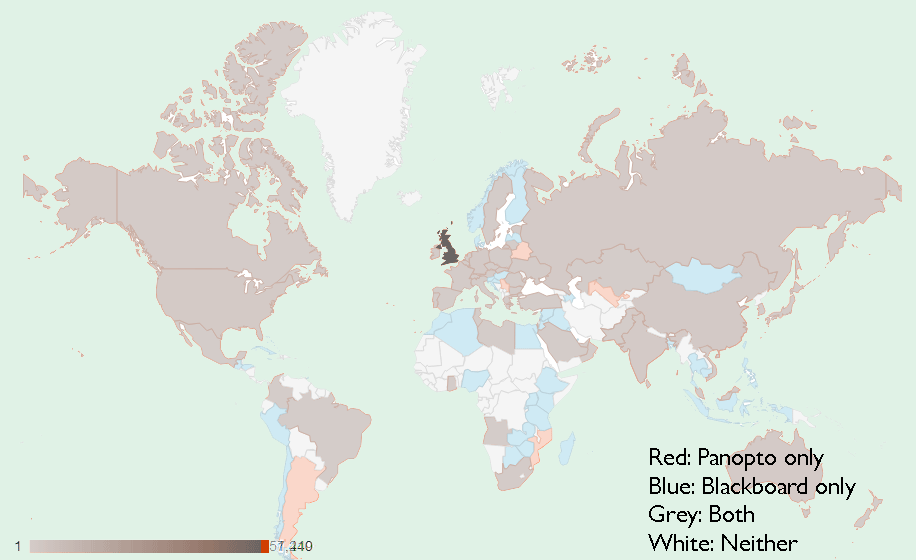
The MLE team has only been running Google Analytics for around 2 months on Panopto and 1 month on Blackboard. As we’ve now had at least a month of both I though it would be interesting to see how many places in the world haven’t had some contact with the University of Southampton’s learning environments. The answer is: not many.

GlobalReach

Click to enlarge. This world map shows areas where Blackboard, Panopto or both have seen at least one confirmed view.

Graham Robinson ⋅ Analytics, Blackboard Analytics, Panopto Analytics ⋅ No comments

July 4, 2013

Panopto Analytics – June 2013

Google Analytics is turned on within a number of MLE sites including Blackboard and Panopto. In the interest of openness we will share a number of pieces of analytical data with the community.

For Panopto these stats are:

  1. Visitors
  2. Unique Visitors
  3. Browser 
  4. Language (of the operating system)
  5. Location
  6. Referrals

Click on more to read the rest of this post

More

Graham Robinson ⋅ Analytics, Panopto Analytics ⋅ No comments

June 14, 2013

Determining the number of monitors

This is a fairly technical post explaining how I managed to get C# to show the number of physical monitors connected to a PC.

My problem was that when connected through VNC or Remote Desktop (or even when I wasn’t) our computers were still reporting that they had a resolution and a default monitor.

More

Graham Robinson ⋅ Technical ⋅ 5 comments

June 13, 2013

Trello

A really useful tool has come our way called Trello. It’s a free website that allows you to organise projects into cards. These cards can then have notes in then with notes having descriptions and checklists that can be added.

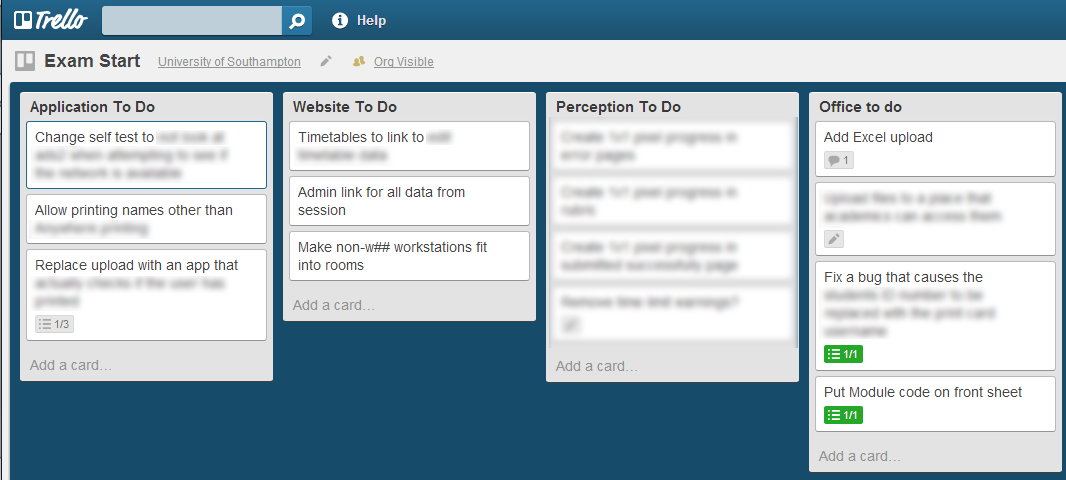
We’re using them at the moment to categorise bugs and service improvements on our systems. The following picture shows improvements to the Computer Based Exams application,  categorised into the different areas of the app.

Screenshot of trello

Our Exam Start Trello page

It’s good to see things progressing and to be able to have an overview of activities, but with a mass of information a click away.

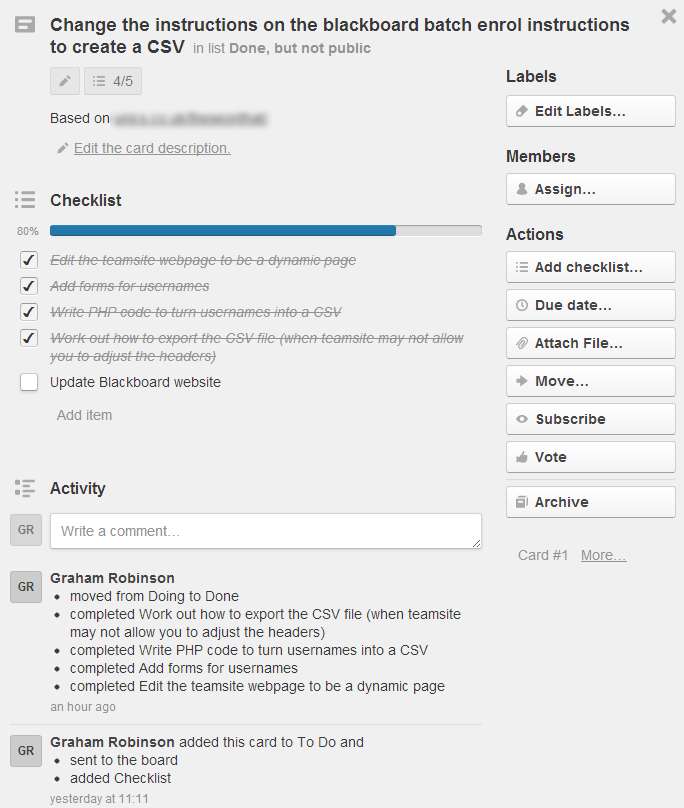
Screenshot of a Trello card

When you click on a note you can view the description, checklists as well as assigning the note to a particular team member

Trello is available for free here: https://trello.com

Graham Robinson ⋅ Non-University tools ⋅ No comments

See more stories
«< 19 20 21 22 23 >

↑

© MLE 2025
Powered by WordPress • Themify WordPress Themes